How to audit website SEO: a 4-layer checklist for small teams
Only 48% of mobile pages pass Core Web Vitals. Here's how to audit website SEO in four layers — technical, on-page, content, and authority.

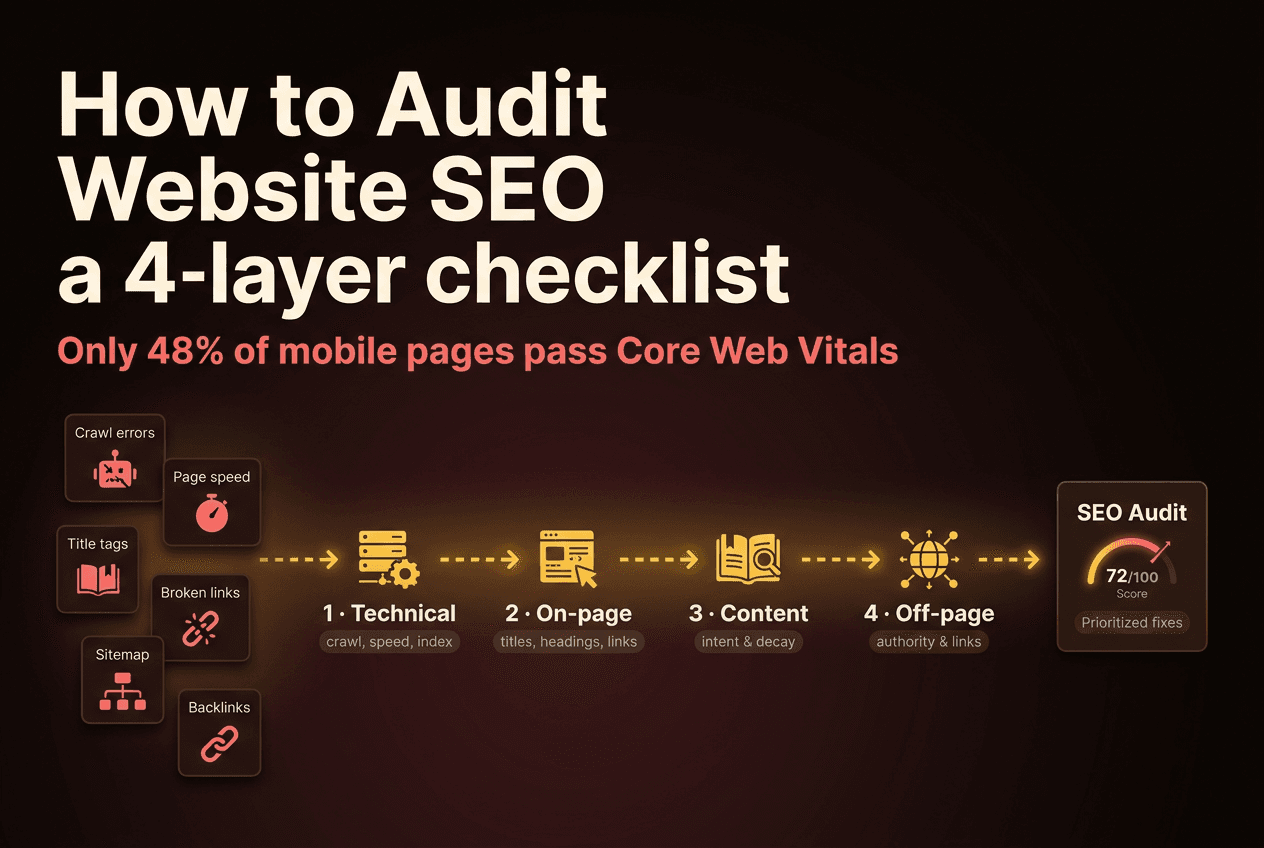
To audit your website's SEO, work through four layers in order: technical (can Google crawl, render, and index the page), on-page (are titles, headings, and links clear), content (does the page match what searchers want and stay fresh), and off-page (does anyone credible vouch for it). The order is the whole trick. Fixing a title tag on a page Google can't crawl is wasted effort.
You don't need an enterprise toolkit for this. Google Search Console and PageSpeed Insights are free, do the crawling for you, and surface most of what a small site needs to fix. The discipline below is what turns those free tools into a decision about where your next hour goes — not another dashboard you open and close.
Key Takeaways
- Audit in four layers, in dependency order: technical → on-page → content → off-page. Each layer assumes the one above it works.
- Only 48% of mobile pages pass Core Web Vitals (Web Almanac, 2025) — speed is the most common fixable issue an audit finds.
- A 0.1-second mobile speed improvement lifted retail conversions 8.4% (Deloitte, 2023). Technical SEO pays in revenue, not just rankings.
- 96.55% of all web pages get zero Google traffic (Ahrefs, 2023). The content layer is about maintaining the few pages that work, not publishing more.
- Free tools — Search Console, PageSpeed Insights, a crawler's free tier — cover most of a small-site audit. The skill is sequencing, not software.
How do you audit a website's SEO?
A website SEO audit is a structured pass through the four things that decide whether a page ranks: can search engines reach it, can they understand it, does it deserve the click, and does anyone link to it. You answer those in order, write down what's broken at each layer, then fix the highest broken layer first. That's it — the rest is detail.
The order matters more than the tooling. A page with a perfect title and a strong backlink profile ranks for nothing if a stray noindex tag is telling Google to skip it. So an audit always runs top-down: crawlability before content, indexation before authority. Skip the sequence and you'll spend a week polishing pages that were never eligible to rank.
This guide is the search-specific deep-dive. If you're not yet sure search is even your weak channel, start one level up with the 30-minute marketing audit — it tells you whether your problem is positioning, funnel, content, or competitors before you commit hours to any one of them. This post picks up where that audit points at search.
One boundary worth naming up front: this is a traditional search audit. Whether AI assistants like ChatGPT and Perplexity cite your pages is a separate dimension with its own checklist — covered in our guide to AI search optimization. Don't try to fix both at once. Get the fundamentals ranking in Google first; the AI-visibility work builds on the same foundation.
Step 1 — Technical SEO: can Google crawl, render, and index you?
Start here because nothing else counts if Google can't reach the page. The headline finding of every large-scale audit is speed: only 48% of mobile pages and 56% of desktop pages pass Core Web Vitals (Web Almanac, 2025). More than half the web fails Google's own user-experience bar — which means your competitors probably do too, and closing that gap is a real edge.
Run three checks, all free. Crawlability: open Search Console → Pages, and read the "Not indexed" reasons. Look for noindex tags you didn't mean to ship (3.5% of pages carry one — sometimes by accident), blocked resources in robots.txt, and orphan pages with no internal links pointing in. Indexation: search site:yourdomain.com and compare the count to how many pages you think you have. A big gap in either direction is a flag. Speed: run your top three pages through PageSpeed Insights and read the field data, not the lab score.
What "good" looks like: every page you want ranked returns a 200 status, appears in the site: index, and passes Core Web Vitals on mobile. The speed bar isn't vanity. A 0.1-second mobile speed improvement lifted retail conversions 8.4% and average order value 9.2% across 30 million sessions (Deloitte, 2023). Faster pages don't just rank better — they convert the traffic you already have.
Our take: the most common technical "issue" at small companies isn't a broken site — it's a sitemap that lists pages you've since deleted, or a staging
noindexthat escaped to production. Audit the gap between what Search Console indexes and what you intended. That gap is where the cheap wins hide.
Write down the single biggest technical blocker you found. Don't fix it yet. Move to Step 2.
Step 2 — On-page SEO: are your titles, headings, and links clear?
On-page SEO is whether Google can understand each page once it reaches it. Almost every page gets the title right — 98.6% have a title tag — but the basics fall off fast after that: only 67.7% have a meta description, 71% have an H1, and 15% of images are missing alt text at the median (Web Almanac, 2025). The missing third is where your audit finds free improvements.
Crawl your site with the free tier of Screaming Frog (or any crawler) and sort by four columns. Titles: each should be unique, under ~60 characters, and lead with the target keyword. Google rewrote 76% of title tags in early 2025 when it judged them too long or off-topic (Search Engine Land, 2025), so a vague title isn't just weak — it's likely to be replaced by something Google guesses. Headings: one H1 per page that matches the title's promise, with H2s that read like the questions a searcher would ask.
The check most teams skip is internal links. The median page has 43 internal links (Web Almanac, 2025), but volume isn't the point — direction is. Your highest-authority pages (homepage, top blog posts) should link down to the pages you want ranked, using descriptive anchor text. A money page with zero internal links pointing at it is invisible no matter how good it is.
What "good" looks like: unique, keyword-led titles; one clear H1; descriptive internal links from strong pages to important ones; alt text on every meaningful image. None of this needs a writer — it needs an afternoon and a crawl export. When you're benchmarking your titles and structure against rivals, our SEO competitor analysis template gives you the side-by-side to copy what's working in your category.
Write down the on-page fix with the widest reach — usually a title-tag pass across your top 10 pages. Move on.
Step 3 — Content audit: does each page match intent and stay fresh?
This is where most sites are quietly bleeding. 96.55% of all web pages get zero search traffic from Google (Ahrefs, 2023, across ~14 billion pages). The content layer of an audit isn't "do we have enough posts?" It's "which handful of pages actually works, and are we maintaining them?"
Two questions per page. First, intent match: does the page give a searcher what their query implies they want? Someone typing "seo audit checklist" wants a scannable list, not a 3,000-word essay with the checklist buried at the bottom. Pull your top 20 pages by impressions in Search Console, read the top query for each, and ask whether the page format answers that query in the first screen. A mismatch is why a page ranks on page two and never climbs.
Second, decay. Content rot is the default state of a blog you stopped touching. Published posts lose roughly 1.21% of weekly traffic in the 12 weeks before a refresh, and refreshing a single post lifted its weekly traffic 55% (Animalz, 2023). Sort your pages by traffic trend. Any top-converting page last updated more than 12 months ago is a refresh, not a rewrite — update the stats, tighten the intro, re-publish.
Our take: the audit almost always ends with the wrong instinct — "we need more content." The right answer is nearly always fewer pages, maintained more often. Treat your top 10 pages like product surfaces you keep shipping, and let the long tail of zero-traffic posts sit. Volume is the trap; maintenance is the lever.
A note on scope: this step covers content for traditional search rankings. Whether that same content gets quoted by AI assistants is a related but distinct audit — if AI Overviews and ChatGPT citations matter to you, run the AI search optimization checklist as a second pass once the fundamentals here are clean.
Write down the one page that should be refreshed before any new content gets written. Move on.
Step 4 — Off-page SEO: does anyone credible link to you?
Off-page SEO is everything that signals trust from outside your domain — mostly backlinks. It's the layer you control least and the one that still moves rankings most for competitive terms. The #1 result in Google has, on average, 3.8 times more backlinks than the pages ranking #2 through #10 (Backlinko). Authority isn't optional at the top of a hard SERP.
You don't need a paid tool to start. Search Console's Links report shows your top linking sites and most-linked pages for free; Ahrefs Webmaster Tools adds referring-domain counts at no cost for verified sites. Pull both and ask three questions. Quantity and quality: are your links coming from a handful of real, relevant sites, or a pile of low-value directories? Concentration: is your link equity pointing at your money pages, or scattered across blog posts? Brand mentions: is anyone citing you without a link — an easy outreach win to convert.
What "good" looks like for a small team is rarely a big number. It's a steady trickle of links from genuinely relevant sites — a partner, a niche newsletter, a podcast you went on — pointing at the pages you most want to rank. One contextual link from a respected site in your category beats fifty from anywhere else. If your audit shows almost no referring domains, that's not a reason to despair; it's the clearest, highest-ceiling growth lever you have.
Write down your authority gap: which money page has the rankings-to-links mismatch — good content, no links. That's your outreach target.
The SEO audit checklist
Copy this into a doc or a recurring calendar block. Each layer assumes the one above it passes — work top to bottom, and stop to fix the highest broken layer before moving on.
1. Technical — can Google reach the page?
- Top pages return a 200 status (no accidental 404s or redirect chains)
- No unintended
noindextags orrobots.txtblocks on pages you want ranked site:yourdomain.comcount roughly matches your real page count- XML sitemap is current and lists only live, indexable pages
- Top pages pass Core Web Vitals on mobile (PageSpeed Insights, field data)
2. On-page — can Google understand it?
- Unique, keyword-led title tags under ~60 characters
- One H1 per page that matches the title's promise
- Meta descriptions present on key pages (Google may rewrite them, but write them)
- Descriptive internal links from strong pages to important ones
- Alt text on every meaningful image
3. Content — does the page deserve the click?
- Page format matches the intent of its top Search Console query
- Top 10 pages identified by traffic and by conversions
- Any top-converting page older than 12 months scheduled for a refresh
- Thin or zero-traffic pages flagged to prune, merge, or leave alone
4. Off-page — does anyone vouch for you?
- Backlink profile reviewed in Search Console + Ahrefs Webmaster Tools
- Links concentrated on money pages, not scattered across the blog
- Unlinked brand mentions logged as outreach targets
- One money page with a rankings-to-links gap picked as the link target
How often should you run an SEO audit — and with what tools?
Run a light audit monthly and a full audit quarterly. The monthly pass is the technical and on-page layers — fast, because Search Console and PageSpeed Insights do the crawling for you. The quarterly pass adds the content and off-page layers, which take judgment and time. Anything less frequent and you'll catch a noindex accident or a Core Web Vitals regression weeks after it started costing you traffic.
The tool stack is short and mostly free. Google Search Console for indexation, queries, and links. PageSpeed Insights for Core Web Vitals. A crawler's free tier — Screaming Frog covers up to 500 URLs — for titles, headings, and broken links. Ahrefs Webmaster Tools for free backlink data on verified sites. That's enough to find every issue in the checklist above. The paid suites are for scale and convenience, not for seeing what's wrong.
What this manual process can't do is remember. Run it yourself and every audit starts cold — you re-derive what your pages are for, which keywords matter, and what "good" looks like for your business, every single time.
That's the gap Sivon closes. Its SEO, on-page, and GEO audits run this same four-layer pass automatically, but from a persistent Brand Blueprint — so the audit already knows your positioning, your ICP, and your priority pages, and scores the gaps against them instead of against a generic benchmark. You get the diagnosis without the cold start, and you get it as often as you want. See pricing for what that costs against the hours a manual quarterly audit eats.
Frequently Asked Questions
How do I audit my website's SEO?
Audit in four layers, in dependency order: technical (can Google crawl, render, and index the page), on-page (are titles, headings, and internal links clear), content (does the page match search intent and stay fresh), and off-page (does anyone credible link to it). Start with the free Search Console and PageSpeed Insights, and fix the highest broken layer first — 48% of mobile pages fail Core Web Vitals (Web Almanac, 2025), so the issue is often technical.
What is an SEO audit?
An SEO audit is a structured review of everything that decides whether your site ranks in organic search — crawlability, speed, indexation, on-page elements, content quality, and backlinks. It outputs a prioritized list of what's broken and what to fix first. Because 96.55% of pages get zero Google traffic (Ahrefs, 2023), most audits find that the problem is a few fixable issues on a few important pages.
How long does an SEO audit take?
A focused first pass on a small site takes two to three hours with free tools. A full audit of a larger site runs a day or two. The technical layer is fastest — Search Console and PageSpeed Insights crawl for you — while the content layer takes longest because judging intent match is manual. Run a light audit monthly and a full audit quarterly so issues never sit for long.
What tools do I need to audit my website's SEO?
Three free tools cover most of it: Google Search Console for indexation, queries, and links; PageSpeed Insights for Core Web Vitals; and a crawler's free tier like Screaming Frog (up to 500 URLs) for titles, headings, and broken links. Ahrefs Webmaster Tools adds free backlink data. You don't need an enterprise suite to find the issues that matter most for a small site.
What's the difference between an SEO audit and a marketing audit?
An SEO audit checks one channel — organic search — across technical, on-page, content, and off-page health. A marketing audit is broader: positioning, funnel, content, and competitive gaps across every channel. The SEO audit is the deep-dive that lives underneath the marketing audit. Run the marketing audit to find which channel is broken; run this one when the answer is search.
Where to start tomorrow
The audit doesn't fix anything — it tells you what to fix, in what order, with evidence. That's the whole value. Most "our SEO isn't working" panic is really an audit gap: nobody has looked at all four layers the same way, in sequence, with a number attached.
So block two hours this week. Open Search Console and PageSpeed Insights. Walk the four layers top to bottom, write down the highest broken issue at each, and fix the technical one first. Marketing budgets are flat at 7.7% of revenue (Gartner, 2025) — there's no budget bailout coming for organic traffic. The leverage is in pointing the hours you already have at the layer that's actually broken.